


Bambu Lab X2D Filament Track Switch
Esaurito
Bambu Lab Filament Track Switch – Flexible AMS Routing for the X2D In previous dual-nozzle printers, each AMS unit has a fixed binding relationship with either the left or right nozzle. When a single AMS is connected, only one nozzle…
0,00€
Esaurito
Bambu Lab Filament Track Switch – Flexible AMS Routing for the X2D
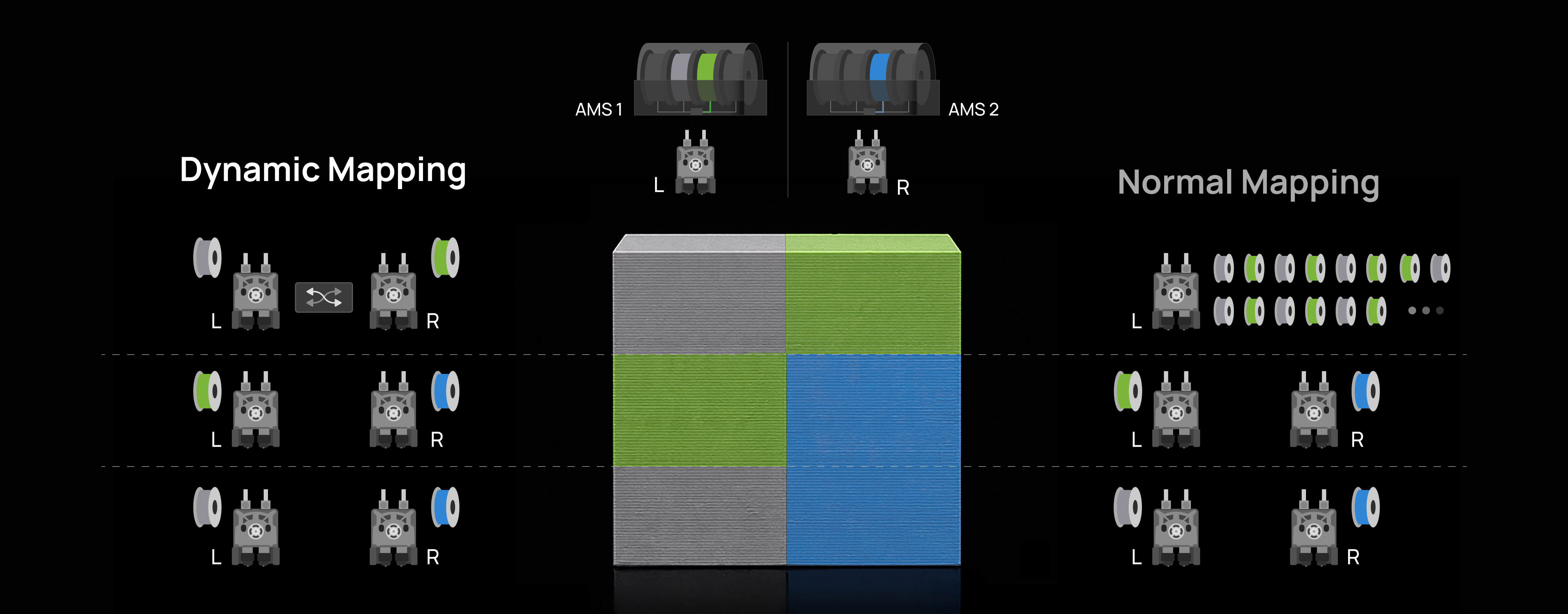
In previous dual-nozzle printers, each AMS unit has a fixed binding relationship with either the left or right nozzle. When a single AMS is connected, only one nozzle has filament available from the AMS — the other must be fed manually from an external spool. The Filament Track Switch changes this entirely. After installation, the fixed binding is released and any filament in any connected AMS can be freely routed to either nozzle, fully controlled by the slicer.
Without Filament Track Switch
With Filament Track Switch
Dynamic Mapping — Smarter Nozzle Assignment
Traditional AMS routing can lock specific filaments to a single nozzle, which limits efficiency when a model’s colour distribution changes layer by layer. With the Filament Track Switch and Dynamic Mapping enabled in Bambu Studio, the slicer intelligently reassigns filaments between nozzles layer-by-layer based on the model’s specific colour layout. This reduces unnecessary purging and improves overall nozzle utilisation. Actual time and material savings vary by model geometry, purge settings, and filament behaviour.
Flexible AMS Expansion
The number of AMS units the printer can connect to is independent of whether the Filament Track Switch is installed. With the switch in place, the X2D supports up to 4 AMS 2 Pro and 8 AMS HT units simultaneously — 12 units with 24 slots in total — linked via the 4-in-1 PTFE adapter. Note that using the 4-in-1 PTFE adapter with only two AMS units is strongly discouraged, as the extra resistance during loading and unloading can compromise print reliability.
Single AMS, Both Nozzles
After installing the Filament Track Switch, a dual-nozzle printer connected to a single AMS can also achieve dual-nozzle printing, supporting filament switching between the left and right hotends. The left and right hotends only support alternating filament feeding — not simultaneous feeding. During the switching process, the AMS first performs a filament unload before reloading the new filament.
Installation and Compatibility
Please refer to the Filament Track Switch installation guide on Bambu Lab Wiki for step-by-step instructions.
Important limitations:
- After installing the Filament Track Switch on the X2D, high-precision nozzle offset calibration cannot be performed. To run this calibration, remove the switch first and restore the printer to its original state. A future firmware update will resolve this limitation.
- Certain filaments — such as PLA-CF, PLA Glow, and PLA Silk — are more sensitive to feed resistance and may fail to load or unload through the switch. Avoid using these filaments through the switch where possible.
- External spools cannot be used with the Filament Track Switch for dynamic routing — a connected external spool permanently occupies one extruder channel.
- Do not use the H2C-specific 4-in-1 PTFE tube adapter II with the X2D — it is not compatible.
Compatibility
- Bambu Lab X2D
Important Notice Before Purchase
- Compatibility: Currently, the Filament Track Switch is only compatible with the X2D. Support for the H2C and H2D is planned for later in 2026. Please refer to firmware updates for the latest compatibility progress.
- AMS expansion limit: After installing the Filament Track Switch, the number of AMS units that can be connected depends on the printer’s supported AMS expansion limit. Please refer to the official specifications of the corresponding printer model for details.
- Single AMS with dual nozzles: When only one AMS is connected, the Filament Track Switch still enables dual-nozzle printing and filament switching between the left and right hotends. However, the left and right hotends support alternate feeding only — not simultaneous feeding. During switching, the AMS must first unload the filament before reloading it.
In the Box
| Item | Quantity |
|---|---|
| Filament Track Switch | 1 |
| 6-pin Cable | 1 |
| PTFE Tube (700 mm) | 2 |
| PTFE Tube (400 mm) | 2 |
| ST3×10 Screws | 4 |
| BT2×8 Screws | 2 |
Based on 0 reviews
Be the first to review “Bambu Lab X2D Filament Track Switch”
You must be logged in to post a review.
Prodotti correlati
-
prima
Snapmaker Toolhead Rear Cover (for U1)
Protect the Toolhead InteriorThe rear cover acts as a protective barrier for the toolhead assembly. By blocking dust and small particles from entering the internal components, it helps maintain stable performance and reduces the risk of contamination inside the toolhead…
SKU: 34243


There are no reviews yet.